Assignment 4: The same, but with NVS
In the previous assignment, we used the simplest option for storing SSID and password; we defined constants directly in the code. Not only is this approach not ideal in terms of changes, where every change in SSID or password must be applied directly in the code and reflash our application. This method also brings considerable security risks.
In this assignment, we will look at how to work with Non-Volatile-Storage (NVS). NVS is often called “emulated EEPROM”. However, ESP32 does not have any built-in EEPROM, so NVS uses flash memory (the same one where we also store our application).
Info: In this assignment, we will use the same project that we used in the previous two assignments.
The principle of data storage in the NVS library is based on key-value pairs (similar to a
dictionary in Python), including types integer, string, and blob (binary data of variable
length).
The size of strings (including the null terminator) is currently limited to 4000 bytes. Blobs are limited to 508,000 bytes or 97.6% of partition size (4000 bytes in our case), whichever is smaller.
NVS is useful especially when we need to store one or more configurations that need to remain persistent - permanently stored in flash memory.
Practical demo of NVS
In the demo, we will show how to prepare a partition table, NVS data file and change the code from the previous assignment so that Wi-Fi name and password are read from NVS.
- Creating a partition table
As we said, NVS uses flash memory. But it is also used for other data. So we need to modify the partition table and allocate space for our NVS partition.
Using the well-known shortcut Ctrl + Shift + P, we open Command Palette and search for Open Partition Table Editor UI.
Info: If you cannot open the Partition Table Editor, verify that you have the Partition Table -> Partition Table option set to Custom partition table CSV in the configuration.
We fill the table using “Add New Row” as shown in the image:
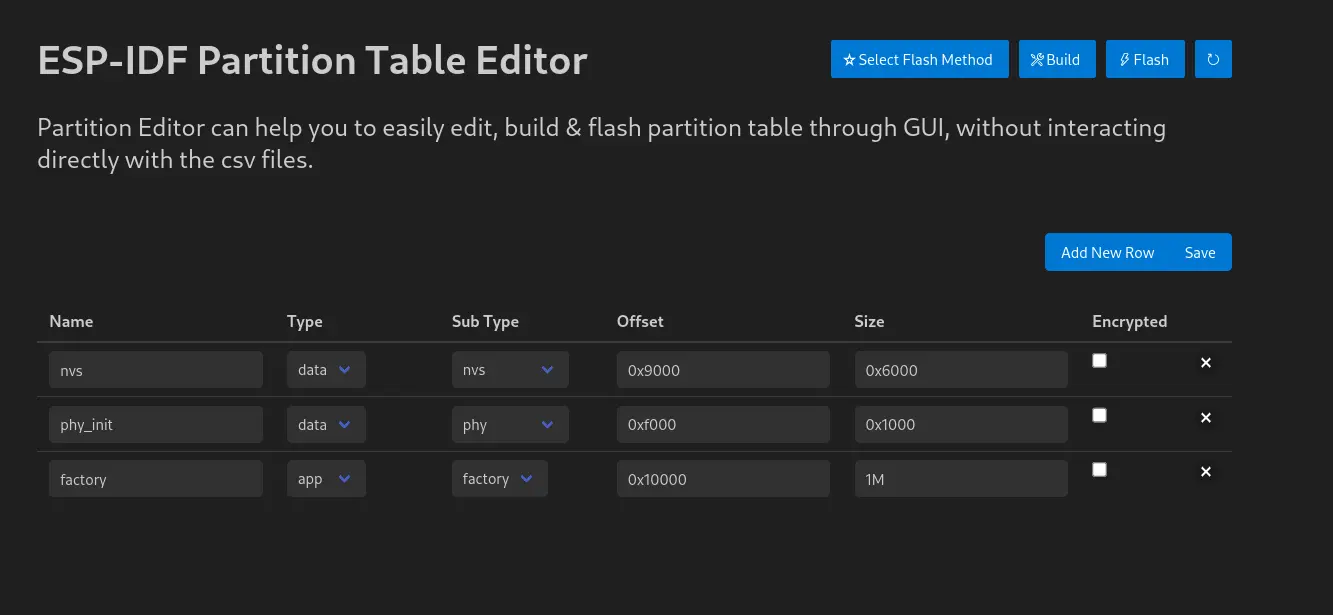
NVS table contents
After clicking the “Save” button, the basic partition table partitions.csv will be saved and
created, which will look like this:
# ESP-IDF Partition Table
# Name,   Type, SubType, Offset,  Size,   Flags
nvs,      data, nvs,     0x9000,  0x6000,
phy_init, data, phy,     0xf000,  0x1000,
factory,  app,  factory, 0x10000, 1M,
Values are also editable directly and individual partitions can be modified according to your own needs.
- Creating NVS file
We open the NVS editor similarly: again using Ctrl + Shift + P we open Command Palette and
select Open NVS partition editor. Then we enter the file name (nvs.csv) and press Enter. A
window similar to the one below will open:
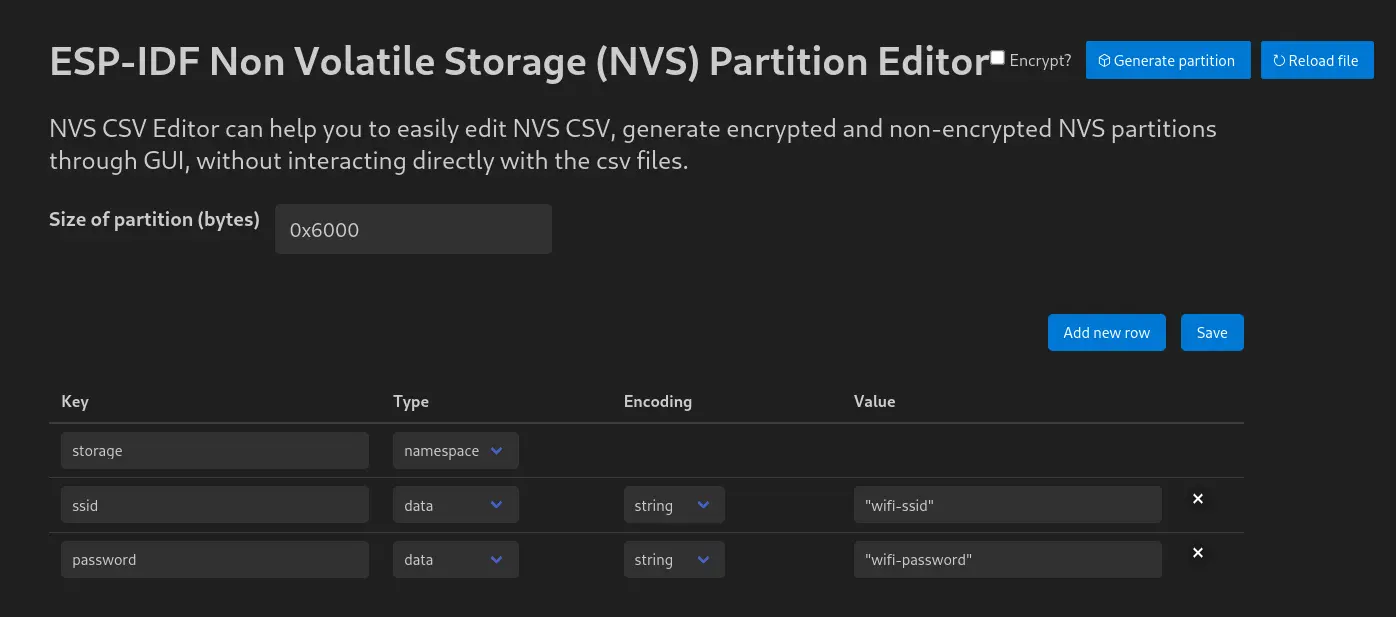
NVS table contents
We change the value Size of partition (bytes) to 0x6000 (same value as in partition table),
add rows using “Add New Row” and fill them according to the image above. Then we press “Save”.
Finally, we can open the nvs.csv file and verify that it looks the same as the one below:
key,type,encoding,value
storage,namespace,,
ssid,data,string,"network-ssid"
password,data,string,"network-password"
- Incorporating NVS code into our project
We will need a skeleton of a new function esp_err_t get_wifi_credentials, into which we will
write code for reading data from NVS:
char ssid[32];
char password[64];

esp_err_t get_wifi_credentials(void){

	//TODO
}
After we have already performed NVS initialization in the previous assignment, we can open the NVS partition:
    ESP_LOGI(TAG, "Opening Non-Volatile Storage (NVS) handle");
    nvs_handle_t my_handle;
    ret = nvs_open_from_partition("nvs", "storage", NVS_READWRITE, &my_handle);
    if (ret != ESP_OK) {
        ESP_LOGE(TAG, "Error (%s) opening NVS handle!\n", esp_err_to_name(ret));
        return;
    }
    ESP_LOGI(TAG, "The NVS handle successfully opened");
Then we can start reading individual values:
char ssid[32];
char password[64];

esp_err_t get_wifi_credentials(void){

	esp_err_t err;

	ESP_LOGI(TAG, "Opening Non-Volatile Storage (NVS) handle");
    nvs_handle_t nvs_mem_handle;
    err = nvs_open_from_partition("nvs", "storage", NVS_READWRITE, &nvs_mem_handle);
    if (err != ESP_OK) {
        ESP_LOGE(TAG, "Error (%s) opening NVS handle!\n", esp_err_to_name(err));
        return err;
    }

    ESP_LOGI(TAG, "The NVS handle successfully opened");

	size_t ssid_len = sizeof(ssid);
	size_t pass_len = sizeof(password);

    err = nvs_get_str(nvs_mem_handle, "ssid", ssid, &ssid_len);
    ESP_ERROR_CHECK(err);

    err = nvs_get_str(nvs_mem_handle, "password", password, &pass_len);
    ESP_ERROR_CHECK(err);

    nvs_close(nvs_mem_handle);
    return ESP_OK;
}
Now we still need to pass SSID and password to the configuration structure:
    wifi_config_t wifi_config = {
        .sta = {
            .ssid = "",
            .password = "",
            .threshold.authmode = WIFI_AUTH_WPA2_WPA3_PSK,
            .sae_pwe_h2e = WPA3_SAE_PWE_BOTH,
            .sae_h2e_identifier = "",
        },
    };

    strncpy((char*)wifi_config.sta.ssid, ssid, sizeof(wifi_config.sta.ssid));
    strncpy((char*)wifi_config.sta.password, password, sizeof(wifi_config.sta.password));
Don’t forget to call our newly created function get_wifi_credentials before wifi_init_sta in
the main function app_main:
ESP_ERROR_CHECK(get_wifi_credentials());
- Build configuration
Since we are using a custom partition table and NVS, we need to change a few things in CMake as
well, specifically in the main/CMakeLists.txt file we call a function that adds the NVS table to
its place (nvs_create_partition_image):
idf_component_register(
    SRCS main.c
    INCLUDE_DIRS
    PRIV_INCLUDE_DIRS
    REQUIRES            esp_wifi esp_netif esp_event nvs_flash led_strip
    PRIV_REQUIRES
)
nvs_create_partition_image(nvs ../nvs.csv FLASH_IN_PROJECT)
- Partition table configuration
Now we still need to tell ESP-IDF to use our partition table. We do this by opening the
sdkconfig.defaults file in the project root directory (if it’s not there, we create it) and add
the following values to it:
CONFIG_PARTITION_TABLE_CUSTOM=y
CONFIG_PARTITION_TABLE_CUSTOM_FILENAME="partitions.csv"
CONFIG_PARTITION_TABLE_FILENAME="partitions.csv"
Now we can change SSID and password without having to intervene directly in the application source code.
Complete code
#include <stdio.h>
#include "led_strip.h"
#include "esp_log.h"
#include "esp_err.h"
#include "freertos/FreeRTOS.h"
#include "freertos/task.h"
#include "freertos/event_groups.h"
#include "esp_system.h"
#include "esp_wifi.h"
#include "esp_event.h"
#include "nvs.h"
#include "nvs_flash.h"
#include "lwip/err.h"
#include "lwip/sys.h"

#define LED_STRIP_GPIO        27
#define LED_STRIP_RMT_RES_HZ  (10 * 1000 * 1000)

#define WIFI_CONNECTED_BIT BIT0
#define WIFI_FAIL_BIT      BIT1

char ssid[32];
char password[64];

static led_strip_handle_t led_strip;

static EventGroupHandle_t s_wifi_event_group;
static int s_retry_num = 0;

static const char *TAG = "workshop";

led_strip_handle_t configure_led(void)
{
    led_strip_handle_t strip;
    led_strip_config_t strip_config = {
        .strip_gpio_num = LED_STRIP_GPIO,
        .max_leds = 1,
        .color_component_format = LED_STRIP_COLOR_COMPONENT_FMT_GRB,
        .led_model = LED_MODEL_WS2812,
        .flags.invert_out = false,
    };
    led_strip_rmt_config_t rmt_config = {
        .clk_src = RMT_CLK_SRC_DEFAULT,
        .resolution_hz = LED_STRIP_RMT_RES_HZ,
        .mem_block_symbols = 0,
        .flags.with_dma = false,
    };
    ESP_ERROR_CHECK(led_strip_new_rmt_device(&strip_config, &rmt_config, &strip));
    ESP_LOGI(TAG, "LED strip initialized successfully");
    return strip;
}

static void led_set_color(uint8_t r, uint8_t g, uint8_t b)
{
    ESP_ERROR_CHECK(led_strip_set_pixel(led_strip, 0, r, g, b));
    ESP_ERROR_CHECK(led_strip_refresh(led_strip));
}

static void event_handler(void* arg, esp_event_base_t event_base,
                                int32_t event_id, void* event_data)
{
    if (event_base == WIFI_EVENT && event_id == WIFI_EVENT_STA_START) {
        esp_wifi_connect();
    } else if (event_base == WIFI_EVENT && event_id == WIFI_EVENT_STA_DISCONNECTED) {
        if (s_retry_num < 30) {
            esp_wifi_connect();
            s_retry_num++;
            ESP_LOGW(TAG, "Trying to connect to WiFi");
            led_set_color(0x0, 0x0, 0x20);
        } else {
            xEventGroupSetBits(s_wifi_event_group, WIFI_FAIL_BIT);
        }
        ESP_LOGE(TAG, "Failed to connect to WiFi");
        led_set_color(0x20, 0x0, 0x0);
    } else if (event_base == IP_EVENT && event_id == IP_EVENT_STA_GOT_IP) {
        ip_event_got_ip_t* event = (ip_event_got_ip_t*) event_data;
        ESP_LOGI(TAG, "got ip:" IPSTR, IP2STR(&event->ip_info.ip));
        led_set_color(0x0, 0x20, 0x0);
        s_retry_num = 0;
        xEventGroupSetBits(s_wifi_event_group, WIFI_CONNECTED_BIT);
    }
}

void wifi_init_sta(void)
{
    s_wifi_event_group = xEventGroupCreate();

    ESP_ERROR_CHECK(esp_netif_init());
    ESP_ERROR_CHECK(esp_event_loop_create_default());
    esp_netif_create_default_wifi_sta();

    wifi_init_config_t cfg = WIFI_INIT_CONFIG_DEFAULT();
    ESP_ERROR_CHECK(esp_wifi_init(&cfg));

    esp_event_handler_instance_t instance_any_id;
    esp_event_handler_instance_t instance_got_ip;
    ESP_ERROR_CHECK(esp_event_handler_instance_register(WIFI_EVENT,
            ESP_EVENT_ANY_ID,
            &event_handler,
            NULL,
            &instance_any_id));
    ESP_ERROR_CHECK(esp_event_handler_instance_register(IP_EVENT,
            IP_EVENT_STA_GOT_IP,
            &event_handler,
            NULL,
            &instance_got_ip));

    wifi_config_t wifi_config = {
        .sta = {
            .ssid = "",
            .password = "",
            .threshold.authmode = WIFI_AUTH_WPA2_WPA3_PSK,
            .sae_pwe_h2e = WPA3_SAE_PWE_BOTH,
            .sae_h2e_identifier = "",
        },
    };

    strncpy((char*)wifi_config.sta.ssid, ssid, sizeof(wifi_config.sta.ssid));
    strncpy((char*)wifi_config.sta.password, password, sizeof(wifi_config.sta.password));

    ESP_ERROR_CHECK(esp_wifi_set_mode(WIFI_MODE_STA));
    ESP_ERROR_CHECK(esp_wifi_set_config(WIFI_IF_STA, &wifi_config));
    ESP_ERROR_CHECK(esp_wifi_start());

    EventBits_t bits = xEventGroupWaitBits(s_wifi_event_group,
            WIFI_CONNECTED_BIT | WIFI_FAIL_BIT,
            pdFALSE,
            pdFALSE,
            portMAX_DELAY);

    if (bits & WIFI_CONNECTED_BIT) {
        ESP_LOGI(TAG, "Connected!");
    } else if (bits & WIFI_FAIL_BIT) {
        ESP_LOGE(TAG, "Failed to connect!");
    }
}

esp_err_t get_wifi_credentials(void)
{
    esp_err_t err;

    ESP_LOGI(TAG, "Opening Non-Volatile Storage (NVS) handle");
    nvs_handle_t nvs_mem_handle;
    err = nvs_open_from_partition("nvs", "storage", NVS_READWRITE, &nvs_mem_handle);
    if (err != ESP_OK) {
        ESP_LOGE(TAG, "Error (%s) opening NVS handle!\n", esp_err_to_name(err));
        return err;
    }

    ESP_LOGI(TAG, "The NVS handle successfully opened");

    size_t ssid_len = sizeof(ssid);
    size_t pass_len = sizeof(password);

    err = nvs_get_str(nvs_mem_handle, "ssid", ssid, &ssid_len);
    ESP_ERROR_CHECK(err);

    err = nvs_get_str(nvs_mem_handle, "password", password, &pass_len);
    ESP_ERROR_CHECK(err);

    ESP_LOGI(TAG, "Retrieved ssid: %s, password: %s", ssid, password);

    nvs_close(nvs_mem_handle);
    return ESP_OK;
}

void app_main(void)
{
    esp_err_t ret = nvs_flash_init();
    if (ret == ESP_ERR_NVS_NO_FREE_PAGES || ret == ESP_ERR_NVS_NEW_VERSION_FOUND) {
        ESP_ERROR_CHECK(nvs_flash_erase());
        ret = nvs_flash_init();
    }
    ESP_ERROR_CHECK(ret);

    led_strip = configure_led();
    led_set_color(0x0, 0x0, 0x20);

    ESP_ERROR_CHECK(get_wifi_credentials());

    wifi_init_sta();
}
Next step
Does it seem complicated to you? Let’s simplify it!